



Appearance
Appearance
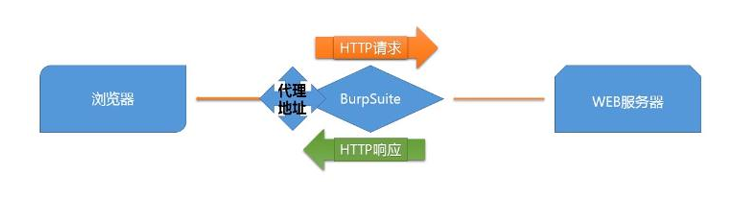
Burp Suite is an integrated platform for performing security testing of web applications. It includes various tools for scanning, fuzzing, intercepting, and analysing web traffic. It is used by security professionals worldwide to find and exploit vulnerabilities in web applications.
In essence, Burp Suite is a Java-based framework designed to serve as a comprehensive solution for conducting web application penetration testing. It has become the industry standard tool for hands-on security assessments of web and mobile applications, including those that rely on application programming interfaces (APIs).
Simply put, Burp Suite captures and enables manipulation of all the HTTP/HTTPS traffic between a browser and a web server. This fundamental capability forms the backbone of the framework. By intercepting requests, users have the flexibility to route them to various components within the Burp Suite framework, which we will explore in upcoming sections. The ability to intercept, view, and modify web requests before they reach the target server or even manipulate responses before they are received by our browser makes Burp Suite an invaluable tool for manual web application testing.
key features
shortcut
| Shortcut | Tab |
|---|---|
| Ctrl + Shift + D | Dashboard |
| Ctrl + Shift + T | Target tab |
| Ctrl + Shift + P | Proxy tab |
| Ctrl + Shift + I | Intruder tab |
| Ctrl + Shift + R | Repeater tab |
脚本添加自定义列
显示服务
if (!requestResponse.hasResponse()) {
    return "";
}

var response = requestResponse.response();

return response.hasHeader("Server")
? response.headerValue("Server")
: "";脚本创建规则
强制所有 HTTP 请求到 https://ginandjuice.shop 并添加 User: Admin 标头
return requestResponse.request()
    .withService(HttpService.httpService("https://ginandjuice.shop"))
    .withAddedHeader("User", "Admin")
.withUpdatedHeader("Host", "ginandjuice.shop");创建一个响应脚本,该脚本使用 MontoyaAPI 功能,当项目满足以下条件时,将带有Cached response (缓存响应) 注释的项目发送到 Organizer:
X-Cache头的值为Hitif(requestResponse.response().headerValue("X-Cache").contains("Hit")) {
api().organizer().sendToOrganizer(HttpRequestResponse.httpRequestResponse(requestResponse.request(),
requestResponse.response(), Annotations.annotations("Cached response")));
}
return requestResponse.response();Burp Suite Repeater enables us to modify and resend intercepted requests to a target of our choosing. It allows us to take requests captured in the Burp Proxy and manipulate them, sending them repeatedly as needed. Alternatively, we can manually create requests from scratch, similar to using a command-line tool like cURL.
Burp Suite's Intruder module is a powerful tool that allows for automated and customisable attacks. It provides the ability to modify specific parts of a request and perform repetitive tests with variations of input data. Intruder is particularly useful for tasks like fuzzing and brute-forcing, where different values need to be tested against a target.
Intruder is Burp Suite's built-in fuzzing tool that allows for automated request modification and repetitive testing with variations in input values. By using a captured request (often from the Proxy module), Intruder can send multiple requests with slightly altered values based on user-defined configurations. It serves various purposes, such as brute-forcing login forms by substituting username and password fields with values from a wordlist or performing fuzzing attacks using wordlists to test subdirectories, endpoints, or virtual hosts. Intruder's functionality is comparable to command-line tools like Wfuzz or ffuf.
There are four sub-tabs within Intruder:
Note: The term "fuzzing" refers to the process of testing functionality or existence by applying a set of data to a parameter. For example, fuzzing for endpoints in a web application involves taking each word in a wordlist and appending it to a request URL (e.g., http://MACHINE_IP/WORD_GOES_HERE) to observe the server's response.
When using Burp Suite Intruder to perform an attack, the first step is to examine the positions within the request where we want to insert our payloads. These positions inform Intruder about the locations where our payloads will be introduced.
Notice that Burp Suite automatically attempts to identify the most probable positions where payloads can be inserted. These positions are highlighted in green and enclosed by section marks (§).
In the Payloads tab of Burp Suite Intruder, we can create, assign, and configure payloads for our attack.
The Positions tab of Burp Suite Intruder has a dropdown menu for selecting the attack type. Intruder offers four attack types, each serving a specific purpose.
Sniper: The Sniper attack type is the default and most commonly used option. It cycles through the payloads, inserting one payload at a time into each position defined in the request. Sniper attacks iterate through all the payloads in a linear fashion, allowing for precise and focused testing.It is particularly effective for single-position attacks, such as password brute-force or fuzzing for API endpoints. In a Sniper attack, we provide a set of payloads, which can be a wordlist or a range of numbers, and Intruder inserts each payload into each defined position in the request.
Battering ram: The Battering ram attack type differs from Sniper in that it sends all payloads simultaneously, each payload inserted into its respective position. This attack type is useful when testing for race conditions or when payloads need to be sent concurrently.
Pitchfork: The Pitchfork attack type enables the simultaneous testing of multiple positions with different payloads. It allows the tester to define multiple payload sets, each associated with a specific position in the request. The Pitchfork attack type is especially useful when conducting credential-stuffing attacks or when multiple positions require separate payload sets. It allows for simultaneous testing of multiple positions with different payloads.
Cluster bomb: The Cluster bomb attack type combines the Sniper and Pitchfork approaches. It performs a Sniper-like attack on each position but simultaneously tests all payloads from each set. This attack type is useful when multiple positions have different payloads, and we want to test them all together.The Cluster bomb attack type is particularly useful for credential brute-forcing scenarios where the mapping between usernames and passwords is unknown.
The Decoder module of Burp Suite gives user data manipulation capabilities. As implied by its name, it not only decodes data intercepted during an attack but also provides the function to encode our own data, prepping it for transmission to the target. Decoder also allows us to create hashsums of data, as well as providing a Smart Decode feature, which attempts to decode provided data recursively until it is back to being plaintext (like the "Magic" function of Cyberchef).
Comparer, as the name implies, lets us compare two pieces of data, either by ASCII words or by bytes.
Sequencer allows us to evaluate the entropy, or randomness, of "tokens". Tokens are strings used to identify something and should ideally be generated in a cryptographically secure manner. These tokens could be session cookies or Cross-Site Request Forgery (CSRF) tokens used to protect form submissions. If these tokens aren't generated securely, then, in theory, we could predict upcoming token values. The implications could be substantial, for instance, if the token in question is used for password resets.
entropy: The measure of randomness of data in a file is known as entropy. Entropy is very useful in identifying compressed and packed malware. Packed or compressed files usually have a high entropy.
The Organizer module of Burp Suite is designed to help you store and annotate copies of HTTP requests that you may want to revisit later. This tool can be particularly useful for organizing your penetration testing workflow. Here are some of its key features:
Ctrl + o. Each HTTP request that you send to Organizer is a read-only copy of the original request saved at the point you sent it to Organizer.在 Burp Suite 中,当你点击 New scan(新建扫描) 时,会看到如你截图中所示的界面。这是 Burp Suite 的核心扫描配置面板。
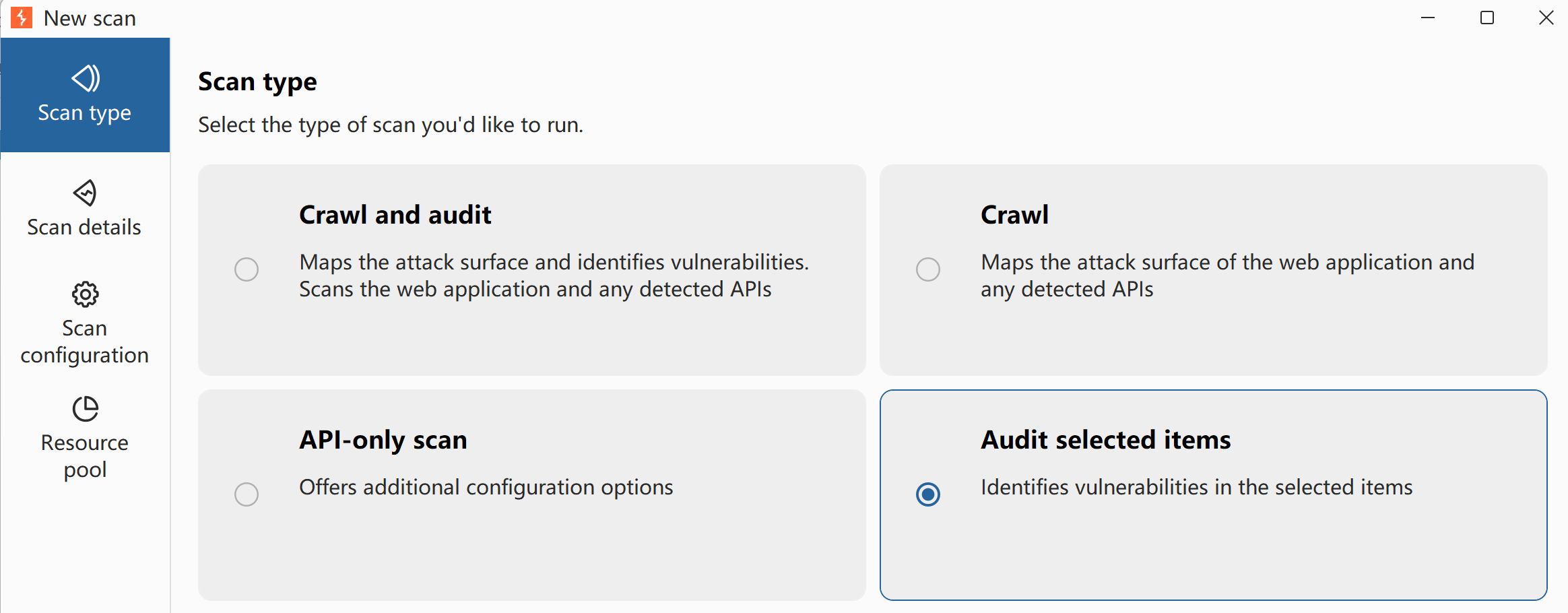
Burp Suite 将扫描任务分为了两个核心步骤:Crawl(爬取/爬网) 和 Audit(审计/漏洞扫描)。
下面为你详细介绍界面中这四种 Scan type(扫描类型) 的区别和适用场景:
Scan,利用这个模式只针对这一个接口进行深度漏洞探测,效率极高且精准。💡 补充:左侧配置菜单介绍
在确定了扫描类型后,你通常还需要配置左侧的其它选项:
在 Burp Suite 中,主动扫描 (Active Scanning) 和 被动扫描 (Passive Scanning) 是两种截然不同的漏洞检测方式。它们的核心区别在于是否向目标服务器主动发送测试请求(Payload)。
以下是两者的详细对比和区别:
HttpOnly 标记、响应中是否包含敏感信息(如身份证号、邮箱、报错信息等)。' OR '1'='1 测试 SQL 注入,或输入 <script>alert(1)</script> 测试 XSS),并分析返回结果或延迟时间。| 对比维度 | 被动扫描 (Passive Scan) | 主动扫描 (Active Scan) |
|---|---|---|
| 流量大小 | 极低(零新增请求,不增加网络带宽负担)。 | 极高(会针对每个参数尝试数百甚至数千个 Payload 请求)。 |
| 对目标的影响 | 完全无害。不会对服务器产生任何写入或破坏性影响。 | 潜在风险。可能导致数据库污染、触发账户锁定、甚至导致服务崩溃(DoS)。 |
| 隐蔽性/防拦截 | 极高。因为没有异常流量,WAF(Web 应用防火墙)和 IDS(入侵检测系统)无法察觉。 | 极低。极易被 WAF 拦截并拉黑 IP。 |
| 检测的漏洞类型 | 侧重于配置缺陷与信息泄露。如敏感信息泄露、不安全的 Headers、密码明文传输等。 | 侧重于需要交互确认的漏洞。如 SQL 注入、XSS、命令注入、任意文件读取、SSRF 等。 |
| 适用环境 | 生产/线上环境、敏感或脆弱的业务系统、日常手动测试时的后台挂载。 | 测试/预发布环境、已获得充分授权的渗透测试。 |
allows developers to create additional modules for the framework.
Turbo Intruder is a Burp Suite extension for sending large numbers of HTTP requests and analyzing the results. It's intended to complement Burp Intruder by handling attacks that require extreme speed or complexity.
应用
To use Python modules in Burp Suite, we need to include the Jython Interpreter JAR file, which is a Java implementation of Python. The Jython Interpreter enables us to run Python-based extensions within Burp Suite.
Follow these steps to integrate Jython into Burp Suite on your local machine:
Once you have completed these steps, Jython will be integrated with Burp Suite, allowing you to use Python modules in the tool. This integration significantly increases the number of available extensions and enhances your capabilities in performing various security testing and web application assessment tasks.
Note: The process of adding Jython to Burp Suite is the same for all operating systems, as Java is a multi-platform technology.
In the Burp Suite Extensions module, you have access to a wide range of API endpoints that allow you to create and integrate your modules with Burp Suite. These APIs expose various functionalities, enabling you to extend the capabilities of Burp Suite to suit your specific needs.
The Extensions APIs give developers significant power and flexibility when writing custom extensions. You can use these APIs to seamlessly interact with Burp Suite's existing functionality and tailor your extensions to perform specific tasks.